Make OAuth Repeatable for Dev Teams: nfauth OAuth 2.0 and OIDC CLI
Most teams do not fail at OAuth because they do not know the spec. They fail because each local script and CLI re-implements auth flow behavior differently.
One script opens a browser. Another expects a pasted redirect URL. A third reads an environment token that has already expired.
The result is familiar: setup friction, inconsistent flows, and wasted debugging time.
If you are looking for an OAuth CLI that behaves consistently across local development and automation, this is the workflow nfauth is built for.
nfauth is a Nuewframe CLI that logs into OAuth 2.0 and OIDC providers, stores tokens in ~/.nuewframe/credential.json, and prints tokens for other CLI tools.
It is designed to make authentication predictable at both protocol and workflow levels, not just for one-off demos.
What nfauth Does as an OAuth 2.0 and OIDC CLI
From the current command surface and project docs, nfauth provides a practical auth baseline:
- interactive browser login for authorization code flows
- headless authorization code flow with URL generation and code exchange
- service-to-service token retrieval with client credentials
- token inspection commands (summary, claims, raw token retrieval)
- command-line token output that can be piped into other tools
- local credential persistence at
~/.nuewframe/credential.json
Example piping pattern:
nfauth token access | pbcopyThat means your tooling can depend on one consistent place to read access tokens.
Technical Model: One Config Surface, Multiple OAuth Flows
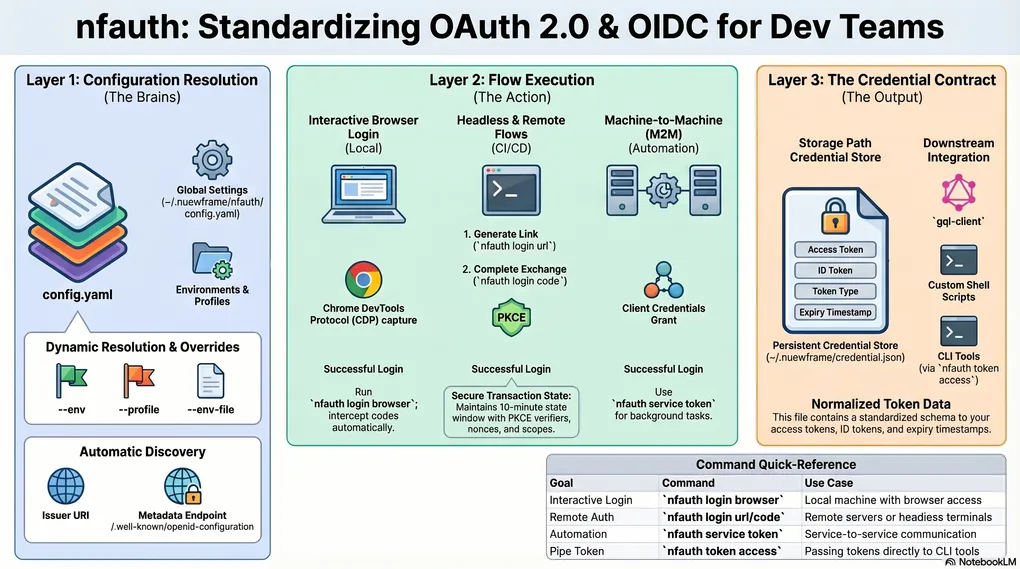
At a systems level, nfauth separates concerns into three layers:
- flow execution: browser, headless URL/code exchange, and client credentials
- configuration resolution: environment/profile selection with command-level overrides
- credential contract: normalized token output persisted to a known path
That separation is what makes it usable in both interactive and scripted workflows.
Configuration is read from one YAML file (~/.nuewframe/nfauth/config.yaml) with active env and profile defaults, while commands can override both via --env and --profile.
For ephemeral and CI scenarios, the same config surface can also be redirected with --env-file, which maps to a NUEWFRAME_CONFIG override path.
When provider discovery URL is not explicitly configured, nfauth resolves metadata from issuer + /.well-known/openid-configuration, keeping endpoint setup portable across environments.
Before each flow executes, nfauth runs grant-aware validation (required endpoints, redirect requirements, and client auth constraints), so invalid combinations fail early instead of surfacing as opaque provider errors.
Quick Start: Get an OAuth Access Token in 30 Seconds
If you want to get from zero to token quickly:
# 1) Initialize local config
nfauth config init

# 2) Add an auth environment
# nfauth config add <issuerUri:string> <clientId:string> [clientSecret:string]
nfauth config add https://your-domain.okta.com \
  your-client-id \
  optional-client-secret \
  --redirect-uri http://localhost:7879/callback

# 3) Log in
nfauth login browser

# 4) Print the saved access token
nfauth token access
This flow is especially useful when onboarding engineers who need a working token path immediately.
OAuth Login Flows: Choose the Right Option
nfauth supports multiple login paths because teams work in different environments:
Implementation detail:
nfauth login browseruses a Chrome DevTools Protocol (CDP) capture path internally to intercept the authorization code when possible, and falls back to manual completion when browser automation is unavailable.
-
nfauth login browserUse this when the machine can open a browser and receive a callback. -
nfauth login urlthennfauth login codeUse this for headless or remote environments where the callback cannot be completed automatically. -
nfauth service tokenUse this for machine-to-machine access where no end-user login is needed.
The practical advantage is that the same CLI works across laptops, remote dev boxes, and automation scenarios.
Protocol Mechanics: Headless Flow State and PKCE
The headless path is not just a convenience mode. It is an authorization code with PKCE workflow split into two explicit commands:
nfauth login urlinitializes the transaction and returns the authorization URLnfauth login codecompletes code exchange after redirect capture
Per project docs, the pending transaction persists key flow state: selected environment/profile, redirect URI, scope, PKCE verifier/challenge, state, nonce, and expiry timestamps. Transactions are valid for 10 minutes.
That state boundary matters for reliability because it prevents command-context drift between URL generation and code exchange.
During login code, nfauth also enforces env/profile continuity with the pending transaction and rejects mismatched execution context.
The redirect URL parser is also used in two stages: an early parse to surface direct OAuth provider errors, followed by state-validated parsing before token exchange.
Use nfauth Tokens with gql-client
Because nfauth prints raw access tokens, it can plug directly into request tooling. For example, this pattern from the docs works with gql-client style HTTP workflows:
@TOKEN: {{ $( nfauth token access ) }}

###
POST https://api.example.com/graphql HTTP/1.1
Authorization: Bearer {{ TOKEN }}
Content-Type: application/json

query Me { me { id email } }
This keeps auth state centralized while letting each tool focus on its own responsibility.
Credential Contract: What Downstream Tools Can Depend On
After successful login or token retrieval, nfauth writes credentials to ~/.nuewframe/credential.json.
The persisted shape includes token fields such as access token, ID token, token type, expiry window, scope, and timestamp.
From an integration standpoint, this gives downstream tools two stable interfaces:
- file contract for tools that read credentials directly
- stdout contract via commands like
nfauth token accessfor shell and HTTP-client pipelines
This is why the same auth session can be reused across scripts, test calls, and API tooling without duplicating OAuth flow logic.
In practice, raw token commands emit the token value directly to stdout, which keeps CLI piping behavior deterministic.
Security and Reliability Notes
nfauth includes a few implementation choices that matter in practice:
- password login reads from a masked stdin prompt instead of CLI flags
- login transactions for headless flow are time-bounded
- token and config operations are organized around explicit environment and profile selection (
--env,--profile)
These details reduce accidental leaks and make behavior more predictable across environments.
For advanced provider behavior, login and service commands also expose endpoint, scope, header, and parameter overrides (--auth-url, --token-url, --param-*, --header-*, and client-credential auth mode controls).
That allows teams to adapt to provider-specific requirements without forking the core flow.
Those overrides are scope-aware: values can apply everywhere, only to authorize requests, or only to token requests.
Claims commands decode JWT structure for inspection, but do not replace cryptographic token verification.
Why an OAuth CLI Improves Developer Experience
For teams shipping APIs, internal CLIs, or service-heavy systems, authentication is a recurring dependency. The goal is not to make OAuth simple. The goal is to make OAuth repeatable.
nfauth helps by standardizing the path from:
- configure provider and client
- run the right login flow
- retrieve tokens in a stable way
- reuse those tokens across tools
That consistency saves time, lowers onboarding friction, and reduces auth-related debugging in day-to-day development.
Install nfauth and Start
Install and try it in your own environment:
curl -fsSL https://raw.githubusercontent.com/nuewframe/nfauth/main/install.sh | sh
nfauth --help
Repository: https://github.com/nuewframe/nfauth
If you are already using Nuewframe tooling, nfauth is a straightforward way to make local auth workflows cleaner and more dependable.